To build a business website, you go through seven steps: decide what the site should do, write down your customers’ questions, plan the structure, prepare copy and photos, choose how to build it, launch it with forms and analytics, and connect it to Google in the first week. A small business usually needs 5–7 pages, and you can get from “we need a website” to the first requests in about a month.
Below is a step-by-step plan for an owner building a website for the first time: where to start, which pages you need and what to write on them, when a website builder is enough and when it’s better to hire a studio, what a website in Ukraine must have, and what to do right after launch. We build websites for small and medium businesses and see where people most often get stuck.
Does your business need a website?
Not every business needs a website from day one. A craftsperson who works through referrals and is booked a month ahead can get by with a Google profile and Instagram. But as soon as you want new customers you don’t know yet, a website becomes almost essential.
A business website works where social media doesn’t. People search for a service on Google or ask ChatGPT — and they see websites, not Instagram pages. You run ads — and send people to a page that sells a specific service, not to a photo feed. A customer compares several providers — and trusts the one with prices, work examples, reviews and clear contacts. And the website belongs to you: it can’t be blocked, and it doesn’t depend on how the social network’s algorithm changed this month.
To be honest, a website doesn’t bring customers on its own. It brings them together with search, ads or referrals — and turns visitors into requests. That’s why below we talk not about a “beautiful website” but about a website that works for sales.

Step 1. Decide what the website should do
Before thinking about design, answer one question: what action should a person take on the site? Leave a request, call, book a time slot, buy a product, or simply make sure you can be trusted. Everything depends on this: the structure, the copy, the buttons and even whether you need a full website at all.
Pick one main goal and one or two secondary ones. For a dental clinic, the main goal is booking a consultation and the secondary one is a call; for an online store it’s a purchase, with a newsletter sign-up as secondary. If you have five equal goals, the business website will try to sell everything at once — and sell nothing.
If you have one service and customers will come from ads, a landing page may be enough — we compared both options in “Landing page or website”.
Step 2. Write down your customers’ questions
Think about what people ask you on the phone, in direct messages and at the first meeting. How much does it cost? How long does it take? Do you work in my area? What’s included in the price? Can I pay in installments? What guarantees are there? Write down 10–15 such questions — it’s the most useful preparation for building a website.
A good website answers these questions before the call. Someone who found the price, timeline and terms on your site arrives already “warm” — and is less likely to disappear after the first conversation. And you don’t have to answer the same questions every day.
Your customers ask Google and ChatGPT the same questions. Pages with clear answers to them show up more often both in search and in AI assistants’ answers — more on that in our article on GEO optimization.
Step 3. Plan the structure: which pages you need
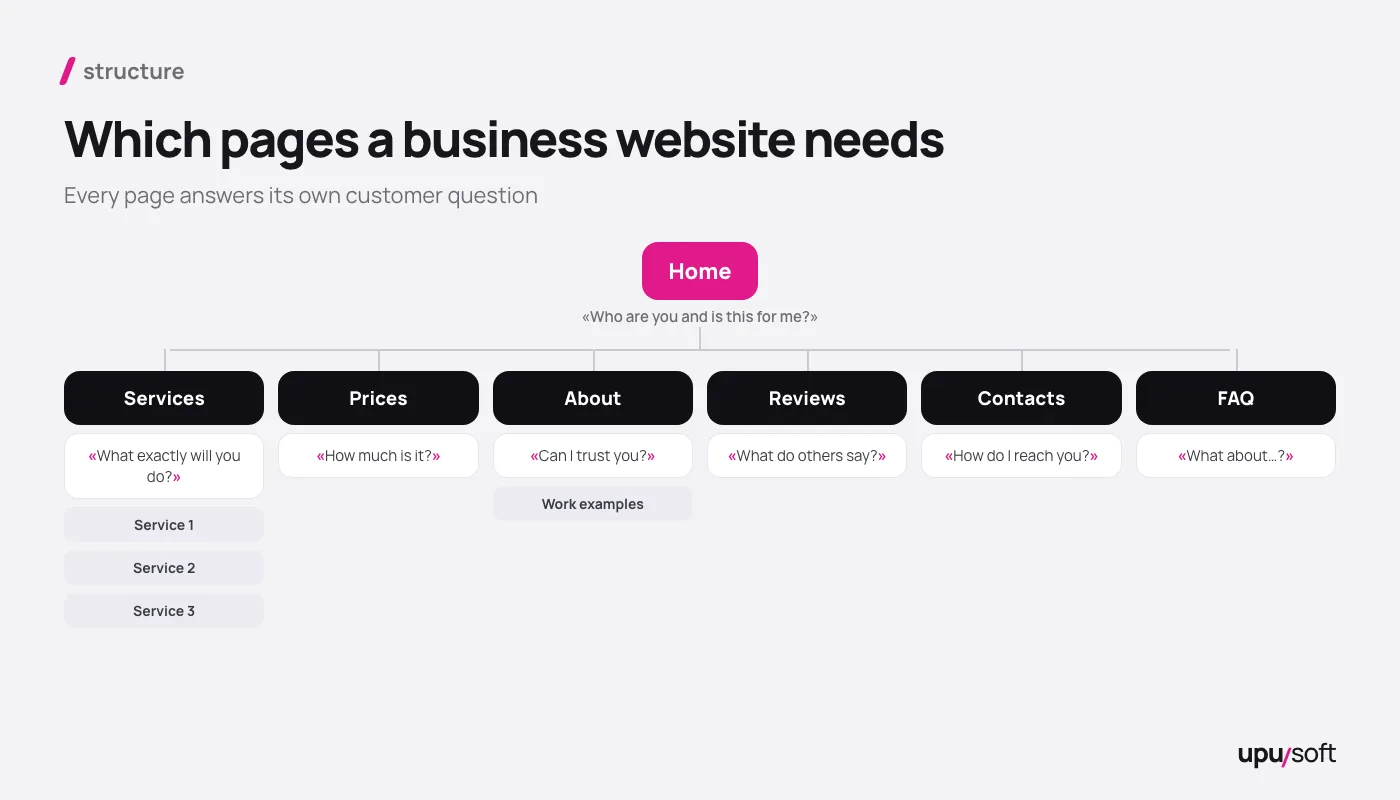
A small business usually needs 5–7 pages. Each one answers its own group of customer questions — so people don’t have to search, and Google and AI find it easier to understand what the site is about.
| Page | Which question it answers | What it should contain |
|---|---|---|
| Home | “Who are you, what do you do, and is this for me?” | what you do, for whom and where; main services; why you can be trusted; a request button |
| Services (a page for each) | “What exactly will you do, and how?” | description, what’s included, price or “from”, timeline, examples, a button |
| Prices | “How much does it cost?” | prices or ranges, what they depend on, what’s included |
| About / work examples | “Can I trust you?” | who you are, experience, photos of real work, certificates |
| Reviews | “What do other customers say?” | real reviews with names or links to Google |
| Contacts | “How do I reach you and where are you?” | phone, Telegram and Viber, address with a map, opening hours |
| FAQ | “What about…?” | answers to those 10–15 questions from step 2 |
Separate pages for each service are the most important point for search: people don’t search for “dentistry” but for “dental implant price”, and it’s a separate page that can rank for such a query on Google. A blog with articles is the next step once the basics are working.
Step 4. Prepare copy and photos
Copy is where any business website most often stalls. The good news: you don’t need to write like a copywriter. You need to write the way you explain things to a customer on the phone — specifically, and about them rather than about yourself.
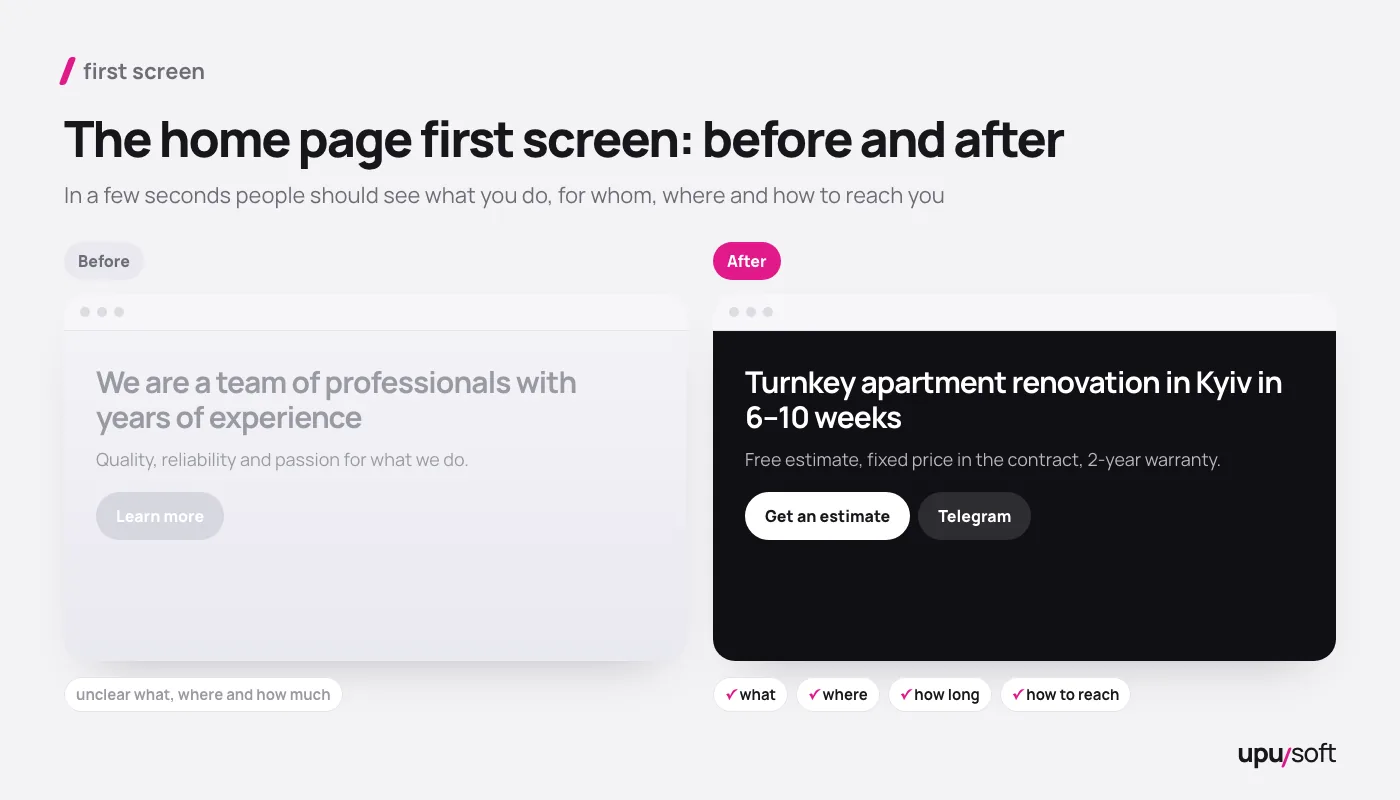
Start with the first screen of the home page. People decide whether to stay in a few seconds, so it needs four things: what you do, for whom, where you work and how to reach you. “Turnkey apartment renovation in Kyiv in 6–10 weeks. Free estimate, fixed price in the contract” works much better than “We are a team of professionals with years of experience”.
For a service page, a simple pattern works well: what problem you solve → how exactly → what’s included → how much it costs (at least “from”) → how long it takes → a request button. Add 2–3 photos of real work and a customer review of that particular service.
About photos: on a small business website, real pictures of your team, premises and work persuade better than the prettiest stock photos. They don’t have to be shot professionally — good light and a phone are enough. Keep stock photos for illustrations where you don’t have your own.
Step 5. Choose how to build the website
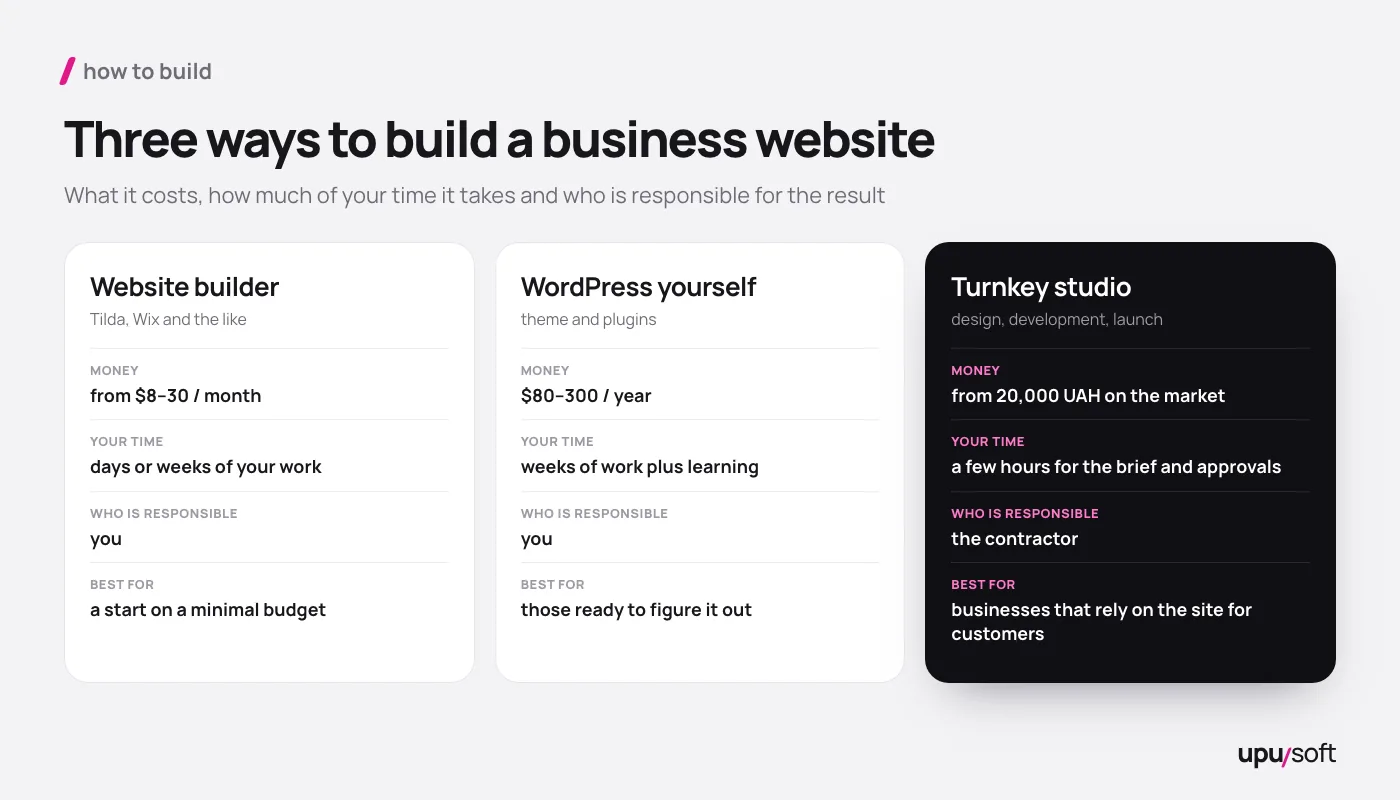
There are three ways to build a business website. None is “right” for everyone — it all depends on your budget, your time and how important the site is for sales.
| Website builder (Tilda, Wix, etc.) | WordPress yourself | Turnkey studio | |
|---|---|---|---|
| Money | a subscription, from $8–30 a month by HOSTiQ’s estimate | $80–300 a year for domain, hosting, theme and plugins | from 20,000 UAH for a company website on the Ukrainian market |
| Your time | days or weeks of your work | weeks of your work plus learning | a few hours: brief, approvals, copy |
| Who is responsible for the result | you | you | the contractor |
| SEO and speed | depend on the template and settings | depend on your knowledge | should be part of the job |
| Risks | platform limits, hard to move away | configuration mistakes, security | choosing an unreliable contractor |
| Best for | a start on a minimal budget, a simple portfolio | those ready to figure it out | businesses that rely on the site for customers |
Price sources: HOSTiQ, 2026, Mozok, 2026.
A website builder is a fine start if you have almost no budget and are ready to spend your own time. But once a business website becomes the main source of customers, saving on it costs more: lost requests, a slow site, rebuilds. What exactly studio development includes and how it goes, we covered in “Turnkey website development”.
A website for your business — about half the market price
We build turnkey websites for small and medium businesses: from structure and copy to launch and requests in Telegram. Our prices for the same work are roughly half the market rate, and we fix the scope and timeline in the estimate.
Step 6. What a website must have
Whoever builds your business website, make sure it has these things:
- A mobile version. The site should be easy to use on a phone: text readable without zooming, buttons easy to tap.
- Quick contact. Phone, Telegram and Viber buttons, a request form — clearly visible on every page.
- A form that actually delivers. Every request should go straight to where you’ll see it: Telegram, email or a CRM.
- Prices, or at least “from”. Without prices, some people leave for a competitor who shows them.
- Address, map and opening hours — for businesses that customers visit.
- An SSL certificate — an https address with no browser warnings.
- A privacy policy — if the site collects names and phone numbers.
- Seller details if you sell online. Ukraine’s Law on Electronic Commerce (Article 7) requires sellers to provide simple, stable access to information about them: the full company name or the sole proprietor’s name, location, email, company code or tax number, and a license if the activity is licensed (Law No. 675-VIII, in Ukrainian).
- Payment and delivery — for a store. Online payment via LiqPay, WayForPay or monobank and Nova Poshta delivery calculation are what Ukrainian shoppers expect by default.
Step 7. Launch and the first week after it
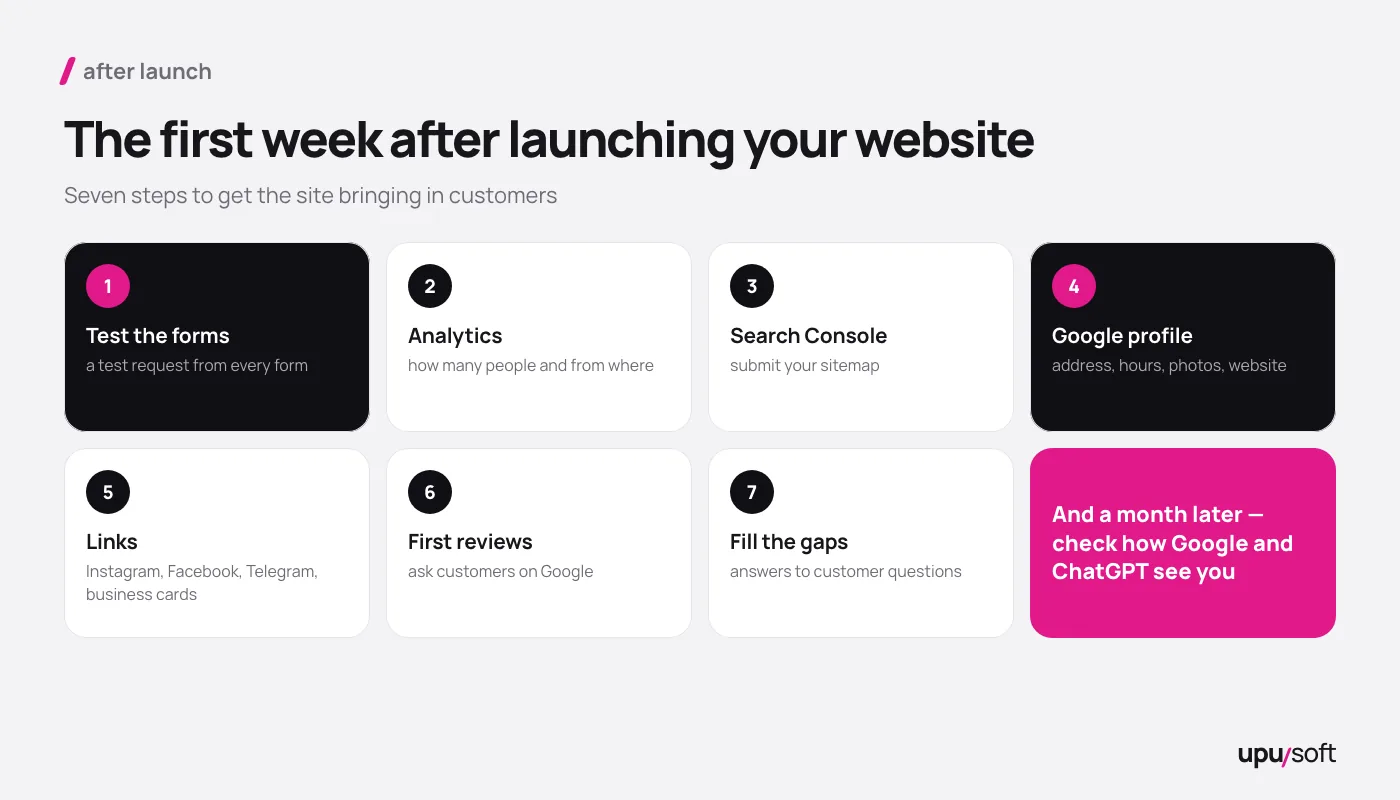
Launch isn’t the finish line, it’s the start. Here’s what to do in the first week so your business website starts bringing in customers:
- Test the requests. Send a test request from every form and make sure it arrives.
- Connect analytics. To see how many people come and from where.
- Add the site to Google Search Console and submit the sitemap — so Google finds your pages faster.
- Create or update your Google Business Profile: address, opening hours, photos and a link to the site. For a local business, it’s often the first thing a customer sees in search and on maps.
- Link to the site from Instagram, Facebook, your Telegram channel, email signature and business cards.
- Ask your first customers to leave a review on Google — reviews affect trust and how you’re shown on maps.
- A month later, check how Google and ChatGPT see you for the questions from step 2 — and fill in the pages that don’t answer them yet.
What a business website costs and how long it takes
The price depends on how many pages and services you need to show, whether the design is custom and which features you need: online payment, booking, several languages. Market benchmarks come from the public price lists of Ukrainian studios compiled by Mozok; the timelines are ours.
| What the business needs | Market price in Ukraine | Our timeline |
|---|---|---|
| A landing page for one service | 12,000 to 30,000 UAH and up | 1–2 weeks |
| A business card or company website with 5–10 pages | 20,000 to 80,000 UAH and up | 3–5 weeks |
| An online store | 35,000 to 150,000 UAH and up | 4–8 weeks |
Price source: Mozok, “How much does it cost to build a website in 2026” (in Ukrainian).
Budget separately for yearly costs: the domain (.com.ua — about $13.5 a year according to HOSTiQ), hosting and, if you want it, support. What exactly drives the price and how to compare quotes, we covered in detail in “How much does a website cost in 2026”. Our prices for the same work are about half the market rate, and we fix the price in the estimate before we start.
Common mistakes
These are the mistakes that leave a business with a website but no requests from it:
- A site about you, not the customer. Company history and mission on the first screen instead of what you do and how you help.
- All services on one page. It’s hard for people to find what they need, and Google can’t tell which queries to show the site for.
- No prices. Even “from” or a range is better than nothing: without prices, some people go to those who show them.
- The form goes nowhere. Requests land in spam or in an inbox nobody reads.
- Domain and access held by the contractor. If something happens to them, you can neither change the site nor move it.
- Built and forgotten. Outdated prices, last year’s promotions, a phone number that no longer works — all of this puts people off more than having no website at all.

Already have a website but few requests? We’ll check it for free
Send us the link — we’ll look at what keeps your site from bringing in customers: speed, mobile version, copy, forms, visibility in Google and ChatGPT. Within a day we’ll reply with a short list of what’s worth fixing.
Frequently asked questions
Can you build a business website for free?
Yes, on the free plans of some website builders. But you pay with the platform’s ads on your pages, a subdomain address, limited features and your own time. That’s fine for testing an idea, but usually not for a site that should bring in customers.
How many pages does a small business need?
Usually 5–7: home, service pages (one for each), prices, about with work examples, reviews, contacts and an FAQ. If you have a single service, a landing page may be enough.
Which is better: Instagram or a website?
Not “or” but “and”. Instagram helps you show your work and stay in touch with people who already know you. A website brings new customers from search, ads and AI assistants and gives them everything they need to decide: prices, terms, reviews, contacts.
Do I need a .ua domain?
Not necessarily. For most businesses in Ukraine, .com.ua works fine: it’s cheaper and familiar to customers. What matters is that the domain is short, easy to dictate over the phone and registered to you.
How long does it take to build a business website?
A landing page takes 1–2 weeks, a company website 3–5 weeks, an online store 4–8 weeks. Timelines depend most on how quickly the copy, photos and feedback on mockups are ready.
How do I get the first customers from my website?
Connect the site to Google Search Console, fill out your Google Business Profile, link to the site from your social media and collect your first reviews. For a quick start, run ads to the page of a specific service.
Conclusion
Building a business website isn’t about picking a template — it’s seven steps: understand what the site should do, write down your customers’ questions, plan the structure, prepare copy and photos, choose how to build it, check the must-haves and launch properly. A small business usually needs 5–7 pages, and it takes about a month from decision to first requests.
Want to go through this without unnecessary mistakes? Tell us about your business — we’ll suggest which website you need and send an estimate. The call is free, with no obligation.